Feature #1902
add paste to right-click context menu for highlighted text
0%
Description
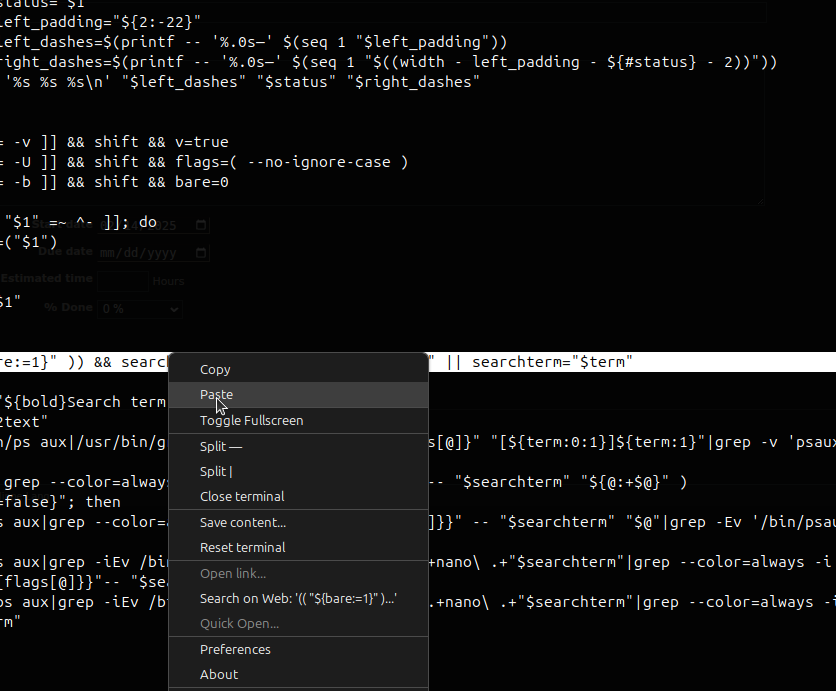
highlight text > right-click > context menu > paste ... instead of going through copy and paste.
Attached is a screenshot of guake's context menu with paste in addition to copy.

History
#1 Updated by iconoclasthero about 2 months ago
iconoclasthero wrote:
highlight text > right-click > context menu > paste ... instead of going through copy and paste.
Attached is a screenshot of guake's context menu with paste in addition to copy.
Weird, I found an email where others had signed onto this FR, but I can't find it in this ... bugzilla? Issue tracking system.
Though looking at the emails, maybe they were spam?
Anyway, still interested in this as a feature!
#2 Updated by david85burger about 1 month ago
iconoclasthero wrote:
highlight text > right-click > context menu > paste ... instead of going through copy and paste.
Attached is a screenshot of guake's context menu with paste in addition to copy.
iconoclasthero wrote: https://www.ez-tag.com.co
highlight text > right-click > context menu > paste ... instead of going through copy and paste.
Attached is a screenshot of guake's context menu with paste in addition to copy.
This Quassel IRC issue is a new feature request to add a "Paste" option to the right-click context menu. It aims to improve user experience and mouse-based navigation for text interactions within the application.